
LMS Redesign
for Aviation
Professionals
A full UX redesign of a live B2B SaaS platform — from a clunky Moodle-based system to a clean, role-specific product used by pilots, instructors, and admins at Aeon Software.
Role
UX Designer
Timeline
2 Months
Team
Lead Instructional Designer, CFO, Frontend & Backend Devs, UI Designer
Status
Shipped-live. see more at aeonsoftware.in/lms
Deliverables
UX Research · Journey Maps · IA · Figma Prototype · Roadmap
CASE STUDY
SHIPPED PRODUCT
01: Overview
B2B SaaS
·
Aviation industry
·
3 user types
·
Live product
·
2-month deadline
A live product.
Real users.
Real deadline.
Aeon Software (and its subsidiary FIDUS) needed to replace their Moodle-based LMS with a user-friendly, scalable solution within 1–2 months while maintaining full business continuity. This wasn't a speculative project, it had a real client, real users, and a real go-live date.
I joined as the sole UX designer, responsible for understanding three very different user groups, mapping their workflows, designing the information architecture, and producing Figma prototypes tested and iterated with the team.
The core tension: balancing fast delivery with thoughtful design.
We needed to fix the most urgent pain points without breaking existing workflows while simultaneously planning the next phase of features.
BEFORE: GENERIC MOODLE

AFTER: REDESIGNED MVP

02: The Problem
Legacy Moodle
·
Navigation failure
·
No feedback loops
·
No role clarity
From cluttered
to purposeful.
The existing Moodle-based platform had accumulated years of patches and workarounds.
The team at Aeon manually added new learners, had an in-house team of course designers, instructors and did admin duties for their clients.
The 'learners' or pilots who consumed the course contents also faced many issues. No clear visual hierarchy, no role-specific views, no way for learners to understand their progress at a glance.
01
NAVIGATION
Learners couldn't track progress
No at-a-glance dashboard. Pilots navigating certification courses had no clear view of what was due, complete, or urgent.
03
ADMIN PANEL
Admins had no central control
Permissions and manual enrollment were scattered across menus. Basic daily tasks required too many steps.
02
INSTRUCTOR FLOW
Content upload was painful for instructors
Too many clicks, unclear upload state, no bulk management. Instructors wasted significant time on SCORM flows.
04
COMMUNICATION
No feedback loops anywhere
Learners received no timely feedback on submissions. No notifications, no progress signals, no event calendar.
03: Users
Pilots
·
Course creators
·
IT administrators
·
Three mental models
·
One platform
Three roles.
Three completely
different needs.
The platform was trying to serve three completely different mental models with a single interface.
The fix wasn't cosmetic, it was structural.
I ran stakeholder interviews with the instructional design lead, CFO, and IT team, then mapped user journeys for all three roles
I included not just the happy path, but also the failure states, workarounds, and moments of highest frustration.

LEARNER
Aviation Pilots
See all courses and progress at a glance
Know what's due without hunting through menus
Receive timely feedback on submissions
Connect with instructors like a real classroom
→
→
→
→

INSTRUCTOR
Course Creators
Upload SCORM packages without friction
View learner performance at a glance
Manage enrollment easily
Switch between creator and manager modes
→
→
→
→

ADMIN
IT Overseers
Control permissions for all users centrally
Manually enroll users in paid courses
Monitor platform health in one place
Minimal steps for common daily tasks
→
→
→
→
"Mapping the journeys made one thing clear: navigation and feedback loops were the biggest blockers for user success — across all three roles."
04: Research
Pilots
·
Course creators
·
IT administrators
·
Three mental models
·
One platform
The process behind
the decisions.
I ran stakeholder interviews with the instructional design lead, CFO, and IT team.
I then built user journey maps and user flows for all three roles, identifying where the current system created the most friction and where we could get the biggest impact fastest.
Key insights from research: learners couldn't see what was urgent or due soon; they wanted to interact with each other like a real classroom.
Instructors spent too much time navigating content upload menus.
There was no centralised calendar or reminder system anywhere in the platform.

User flow: streamlined paths for learners, instructors, and admins. With intervention points and future feature placeholders clearly marked. Also showing Information Architecture.
05: Solutions
Role-specific views
·
Calendar integration
·
Dark mode
·
Instructor onboarding split
·
AI chatbot placeholder
Six decisions that
changed how
it felt.
Every solution was tied directly to a pain point from research, nothing added speculatively.
I focused on clarity, hierarchy, and future-readiness: fixing what was broken now while building a structure that could grow.
◫
Unified Calendar View
Deadlines, live sessions, and upcoming events consolidated into one glanceable view — the most-requested learner feature.
◑
Dark / Light Mode
Research revealed late-night study sessions across time zones. Both modes designed and tested from the start, not bolted on.
↳
Role-Specific Dashboards
Learner, instructor, and admin each land on a completely different default view optimised for their primary task.
≡
Homepage Hierarchy
Critical info: progress, deadlines, notifications are above the fold.
Land and immediately know where you stand.
⇄
Instructor Onboarding Split
Some instructors only create, some only manage, some both. Onboarding detects the role and configures the dashboard accordingly.
✦
AI Chatbot Placeholder
Designed the interaction model and screen space for a future support bot so it can be added without restructuring the layout.
06: Wireframes
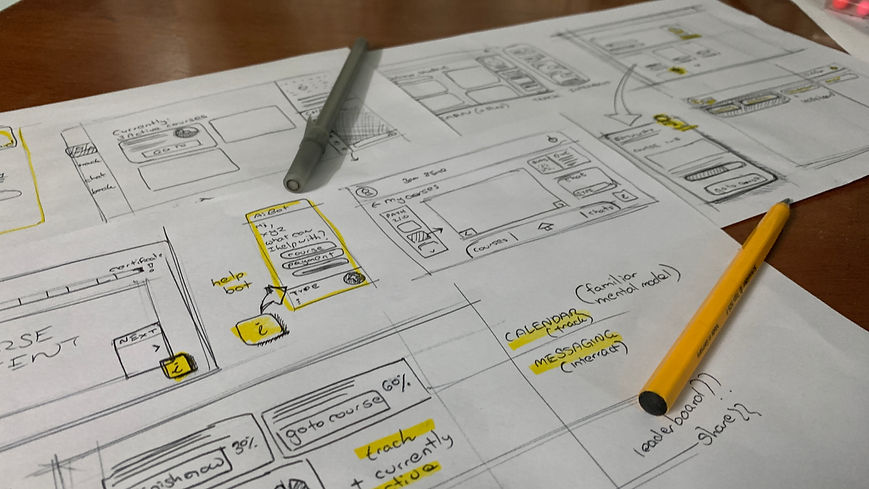
Paper first
·
Then Figma
·
Then in-house testing
·
Learner flows
Paper first.
Figma second.
Users always.
I created low-fidelity wireframes on paper, then moved to Figma esting internally at each stage to find the most intuitive flows before committing to higher fidelity.
The question at every step: can a user land on this screen and immediately know what to do next?

User flow: streamlined paths for learners, instructors, and admins. With intervention points and future feature placeholders clearly marked. Also showing Information Architecture.

Onboarding flow — simplified for a multi-pathway LMS where users enter at very different points

Learner dashboard — course progress, calendar, chat, and upcoming events above the fold

Instructor dashboard — course statistics and learner management in a single scan, role-configured on first login

Redesigned course viewer — better progress tracking and integrated communication panel

In-course communication feature — the most-requested addition from learner research

Instructor feature: manage groups of learners as "cohorts"

INSTRUCTOR feature — manage individual learners in cohort

INSTRUCTOR feature — manage courses

INSTRUCTOR feature — manage all learners
"I wanted users to land on the homepage and immediately know where they stand, what's next, and how to act, no guesswork."
About the core design goal for all three dashboards
07: Outcome
Shipped on time
·
Live product
·
Phase 2 roadmap adopted
Shipped. Used.
Ready to scale.
The redesigned MVP launched on schedule.
Role-specific dashboards reduced navigation confusion, the streamlined upload flow improved instructor efficiency, and stakeholders signed off on the future-proof roadmap as the product's north star for phase two.
See it live at
3
User types, each with a role-specific dashboard configured on first login
2m
Full UX redesign delivered from brief to shipped product in 2 months
6
Design solutions each tied directly to a research-identified pain point
v2
Phase 2 feature roadmap adopted by the product team as the official plan
Phase 2 Roadmap:
08: Reflections
What shipping
under pressure
taught me.
✓ What worked
Delivering under a hard deadline while genuinely improving usability.
Starting with user journeys not screens meant every design decision had a clear rationale the whole team could get behind, which made sign-off fast and revisions minimal.
⚠ Challenge
Prioritising features under time pressure meant constantly defending scope.
Many good ideas had to wait for phase two.
The skill was clearly communicating why certain features were deferred, not dropped keeping stakeholder trust intact.
→ Next time
More user testing earlier to validate information hierarchy.
Internal usability testing was useful but couldn't replace testing with actual aviation professionals navigating their real certification workflows.
